1 min read
How AI can transform financial reporting in D365 BC
Financial leaders need real-time insights to make fast, informed decisions. Yet for many CFOs, CEOs, and finance analysts, financial reporting...
10 min read

Finance teams do not need another place to check numbers. They already have reports, spreadsheets, dashboards, exports, month-end packs, and standard ERP views. The real problem is usually different: the data exists, but getting to the answer still takes too much time.
A CFO wants to understand why margin dropped. A controller needs to explain which cost categories moved against budget. A finance manager wants to compare performance by department, region, or product group. These are everyday finance questions, but answering them often means opening Excel, checking mappings, refreshing reports, or asking IT for support.
AI Financial Intelligence by Data Courage changes this experience for companies using Microsoft Dynamics 365 Business Central.
-2.png?width=900&height=700&name=Untitled%20design%20(6)-2.png)
Built for Business Central, the app helps finance teams generate financial reports, evaluate results, and ask follow-up questions in natural language, directly in their ERP environment. It supports Profit and Loss and Balance Sheet reporting, AI-generated insights, report evaluation, dimensions, and chat-based financial analysis.
Instead of only showing what happened, AI Financial Intelligence helps finance teams understand why it happened and what deserves attention next.

Traditional reporting is important, but it often stops too early.
A report can show revenue, margin, costs, and balances. But finance leaders need to go further. They need to explain what changed, why it changed, which areas need attention, and what the business should do next.
That is where many reporting processes slow down.
If the answer is not already available in a standard report, finance teams often need to:
This creates delays at exactly the moment when leadership needs clarity.
In our customer story, a mid-sized manufacturing company had its financial data in Business Central, but the answers were still buried in spreadsheets, silos, and outdated reports. Month-end was slow, decision-making was delayed, and confidence in reporting was weak.
AI Financial Intelligence helps finance teams work differently. It brings reporting, evaluation, and financial conversation closer together, directly inside Business Central.

Natural-language financial reporting means asking questions about financial data using normal business language.
Instead of searching for the right report, setting filters manually, or rebuilding an analysis in Excel, users can ask questions such as:
The goal is not only to get a number faster. The goal is to make financial analysis easier to start, easier to understand, and easier to use in real business conversations.
For finance teams, that distinction matters. A table of numbers still needs interpretation. AI Financial Intelligence helps users move from raw data to structured insight, commentary, and follow-up questions.
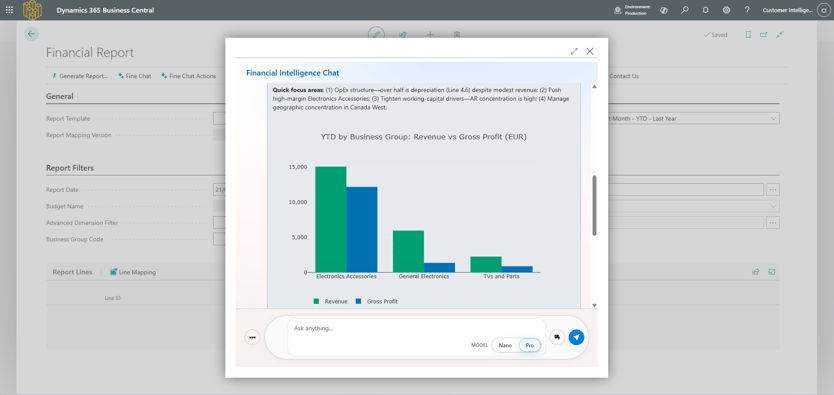
AI Financial Intelligence is an AI-powered app for Microsoft Dynamics 365 Business Central. It helps finance teams generate reports, evaluate numbers, and ask questions about financial data directly inside the ERP.
It is designed for finance users, not technical users.
That means the focus is not on building complicated queries. The focus is on helping CFOs, controllers, finance managers, and accounting teams get to useful answers faster.
One of the core functions of AI Financial Intelligence is financial report generation.
The app supports Profit and Loss and Balance Sheet reporting using templates, mappings, report parameters, and column layouts. This helps finance teams create structured reports inside Business Central and then use AI to evaluate the results.
For many teams, this is already a major improvement.
Instead of spending hours preparing the same report every month, users can generate reports faster and move more quickly into analysis.
But report generation is only the first step.
The bigger value comes when finance can immediately ask: what does this report tell us?
Once a report is generated, users can evaluate it with AI.
This helps finance teams move from “here are the numbers” to “here is what the numbers mean”.
AI Financial Intelligence can help describe the report, highlight important movements, and support users in understanding the financial story behind the data.
For controllers and finance managers, this is especially useful during recurring reporting cycles. They still apply their own judgement, but they do not have to start every explanation from a blank page.
Instead of manually scanning the report for changes, they can use AI as a starting point for analysis.
This saves time and helps finance teams focus on interpretation, review, and business context.
Finance questions usually do not stop after the first answer.
A CFO may ask about margin. Then they may want to see the same result by department. Then they may ask what changed compared with the previous period. Then they may want to understand whether the movement is connected to costs, revenue, or another business factor.
This is why conversational analysis matters.
AI Financial Intelligence includes chat-based functionality that allows users to ask questions and continue the analysis in a more natural way. Instead of treating each question as a separate reporting task, users can explore financial data through a conversation.
This makes the experience more practical for real finance work.
Users do not always know exactly which report to open first. They often start with the business question. AI Financial Intelligence helps them work from that question towards the right financial context.
.png?width=1549&height=948&name=image%20(1).png)
In Business Central, dimensions are often where the real business meaning lives.
Finance teams rarely want to look only at total revenue or total costs. They want to understand performance by:
department,
region,
product group,
customer segment,
project,
cost centre,
business unit,
AI Financial Intelligence supports dimension-based reporting, including dimensions in columns. This allows users to analyse financial data in a way that reflects how the business is actually organised.
For example, a finance team may want to compare costs between departments, analyse sales by product category, or review performance across different areas of the company.
This is where AI becomes much more useful.
A simple total can show that something changed. Dimension-based analysis helps users understand where it changed and which part of the business needs attention.
AI Financial Intelligence also supports dimension context, helping the AI understand the meaning of dimensions in a company’s financial structure.
Because in finance, context matters.
The same number can mean different things depending on which department, region, cost centre, or reporting structure it belongs to.
Financial analysis does not end when the answer appears on screen.
Finance teams often need to reuse results, compare periods, prepare explanations, or share outputs with other stakeholders.
AI Financial Intelligence supports saved reports, saved AI insights, insight history, and export options. This gives finance users more flexibility in how they work with the results.
A controller may want to save an explanation for month-end review. A finance manager may want to export a report for further work. A CFO may want a short summary for a leadership meeting.
The goal is not to remove every familiar finance process.
The goal is to make the first answer faster, clearer, and easier to use.
There are many ways to analyse financial data. But for Business Central users, the location of the analysis matters.
When data is exported into another tool, it can quickly become another version of the truth. It may be outdated, disconnected from the ERP, or managed through a separate process.
For finance teams, that creates friction.
It also creates questions:
By bringing AI-powered analysis directly into Business Central, AI Financial Intelligence keeps finance work close to the source system.
Users can generate reports, evaluate results, and ask questions in the environment they already know.
That makes adoption easier. It also helps finance teams stay connected to their Business Central data instead of constantly moving between systems, spreadsheets, and dashboards.

The best way to understand natural-language financial reporting is to think about the questions finance teams already answer manually.
With AI Financial Intelligence, finance users can explore questions around performance, variance, profitability, costs, dimensions, and financial movements.
For example:

When finance teams spend too much time preparing reports, they are often forced into a reactive role. They answer questions after the meeting. They explain results after decisions have already been made. They spend time proving the numbers before they can discuss what the numbers mean.
AI Financial Intelligence helps change that rhythm.
Finance teams can come into conversations with better context, faster explanations, and more confidence. They can respond to follow-up questions more naturally. They can support leadership with insight, not only reporting. This is where finance becomes more strategic.
The conversation moves from: “What happened?” to: “Why did it happen?” and then to:
“What should we do next?”. That is the shift we care about.
AI Financial Intelligence is not a generic AI layer placed on top of financial data.
It is built around the way finance teams work in Microsoft Dynamics 365 Business Central.
The app works with Business Central financial structures such as Chart of Accounts, report templates, mappings, layouts, and dimensions.
That matters because finance teams do not work with abstract data. They work with specific accounts, specific structures, and specific reporting logic.
AI Financial Intelligence is not trying to answer every possible business question.
It is focused on financial reporting, financial explanation, and financial analysis.
That focus makes the experience more relevant for CFOs, controllers, finance managers, accounting teams, and Business Central partners working with finance customers.
Reporting tells you what happened.
Financial intelligence should help you understand why it happened.
This is the core idea behind our AI apps: helping businesses discover the “why” behind their data, whether that data relates to finance, customers, or items.
With AI Financial Intelligence, we start with the financial story.
For partners, AI Financial Intelligence is also easy to demonstrate because the value is immediately understandable.
You can ask real financial questions and show real answers inside Business Central.
For customers, this creates a practical AI use case that is not abstract. It is connected to the work finance teams already do every month.
AI can help generate, evaluate, and explain financial data, but finance teams still need to validate important outputs and apply professional judgement.
This is especially important in finance, where decisions depend on accuracy, context, and responsibility.
AI should support finance teams, not replace their expertise.
A broad question can be useful as a starting point, but specific questions usually produce more useful answers.
Instead of asking: “How are we doing?”, it is better to ask:
The more precise the question, the more useful the answer.
If dimensions are not used consistently in Business Central, analysis becomes harder.
AI Financial Intelligence supports dimension-based reporting and dimension context, but the quality of insight still depends on how well the underlying financial structure reflects the business.
Good financial intelligence starts with good financial structure.
Ad hoc analysis is valuable, but the biggest impact comes when AI becomes part of the finance rhythm.
Use it in monthly review, close preparation, variance analysis, management reporting, and leadership conversations.
That is when AI Financial Intelligence becomes more than a useful feature.
It becomes part of how the finance team works.
Natural-language financial reporting is not about replacing finance teams. It is about giving finance teams a faster, clearer way to work with the data they already have.
AI Financial Intelligence by Data Courage helps Business Central users generate financial reports, evaluate results, ask questions, analyse dimensions, save insights, and understand the story behind the numbers.
For CFOs and controllers, this means fewer delays and more confidence in financial conversations. For finance teams, it means less time spent preparing reports and more time spent explaining performance. For Business Central partners, it creates a practical AI story that is easy to show and easy to understand: finance users can ask real questions, get real answers, and move from static reporting to meaningful financial insight.
The future of finance in Business Central is not just automated. It is conversational, contextual, and focused on better decisions.
AI Financial Intelligence is an AI-powered app for Microsoft Dynamics 365 Business Central. It helps finance teams generate financial reports, evaluate numbers, ask questions through AI chat, and better understand financial performance.
Yes. AI Financial Intelligence allows users to ask questions about financial reports and data in natural language. This helps finance users explore results, understand variances, and continue analysis through follow-up questions.
AI Financial Intelligence supports Profit and Loss and Balance Sheet reporting. It also includes templates, mappings, report layouts, dimensions, report evaluation, saved reports, saved insights, and export options.
No. It complements existing financial reporting.
Standard reports are still important for formal reporting, governance, audits, and repeatable processes. AI Financial Intelligence adds faster analysis, explanation, and conversational insight on top of that.
No. CFOs are an important audience, but the app is also relevant for controllers, finance managers, accounting teams, FP&A users, and Business Central partners.
The common need is the same: faster access to financial answers and better understanding of the numbers.
No. Ad hoc questions are one use case, but AI Financial Intelligence can also support recurring finance processes such as month-end close, P&L review, budget vs actual analysis, department cost review, and leadership meeting preparation.
Results depend on the company’s Business Central setup, data quality, reporting structure, and internal processes.
In our customer work, we have seen finance teams reduce manual reporting effort, answer more questions without IT support, and move faster from report preparation to financial analysis. The exact outcome depends on each organisation’s starting point and how the solution is adopted.

1 min read
Financial leaders need real-time insights to make fast, informed decisions. Yet for many CFOs, CEOs, and finance analysts, financial reporting...

1 min read
Closing the books at month-end shouldn't feel like running a marathon. Yet for many finance teams using Microsoft Dynamics 365 Business Central, the...

1 min read
Finance leaders don’t struggle to understand why AI has become part of the conversation. What slows progress is what happens after the initial...
